
The best place for a GPS antenna is dead centre of the exterior roof. It has a full, unobstructed view of the sky, and the metal roof itself works as a natural ground plane that boosts signal quality without you doing anything extra.
If roof mounting genuinely isn’t possible, the top of the dashboard near the windscreen is your fallback, but only if the glass isn’t coated with a metallic (athermic) layer that blocks GPS signals outright — you can explore professional fitting options at AT Cars for expert advice and installation.
Here’s your do-this-now checklist:
- Mount the antenna face-up and completely level, never tilted or on its side
- Keep it clear of other antennas, dash cams, and anything with a power cable running through it
- After fitting, run a time-to-first-fix (TTFF) test in open sky before you trust the placement
Pro tip: A tracker with perfect specs will still perform badly from a bad location. Placement beats hardware almost every time.
Key Takeaways
Correct GPS antenna placement, roof centre with a ground plane, face-up orientation, and interference-free cable routing, determines reception quality far more than the antenna’s specifications.
| Point | Details |
|---|---|
| Roof centre wins | Full sky view plus a built-in metal ground plane make it the strongest default placement. |
| Check your glass first | Athermic or heated windscreen coatings block GPS signals and rule out most dashboard mounts. |
| Ground plane size matters | Use a metal ground plane with a 10 to 15 centimetre radius on non-metal roofs or glass. |
| Keep interference away | Separate the antenna and cable from dash cams, ignition wiring, and other transmitters. |
| Test before you trust it | Run a TTFF and satellite count check in open sky to confirm the placement actually works. |
| Land Rover needs specialist fitting | Lrd-track’s Thatcham-approved installers route around roof racks and coated glass on Defender, Discovery, and Range Rover models. |
Table of Contents
- Best GPS antenna placement in a car: roof, dash, and beyond
- How should you mount and orient a GPS antenna?
- What causes GPS signal interference in a car, and how do you avoid it?
- How do you test and troubleshoot GPS reception in a car?
- Why professional installation matters for Land Rover owners
- What most placement advice gets backwards
- Get your Land Rover tracked by people who know exactly where to put it
- Frequently asked questions
- Sources
Best GPS antenna placement in a car: roof, dash, and beyond
Roof-centre placement wins for one simple reason: physics. A GPS antenna needs a clear line of sight to satellites sitting anywhere from the horizon up to directly overhead, and nothing does that better than the highest, flattest, most open point on the vehicle. The roof also happens to be metal on the vast majority of cars, vans, and 4x4s, and that metal shell doubles as a ground plane, a reflective surface directly beneath the antenna that reduces multipath interference and improves signal gain. Installers generally agree that roof-centre mounting gives the most reliable fix, and that correct placement matters more than which antenna model you buy.
Racelogic’s own installer guidance backs this up in more technical terms: mount the antenna in the centre of a metal roof, away from roof edges and reflectors, since edges and roof rails scatter signals and create dead spots. Centre-mounting also keeps the antenna equidistant from every direction, so no single side of the sky gets blocked more than another.
The dashboard is your next-best option, but check the glass first. Many modern windscreens use an athermic (metal-oxide) coating to reduce heat transfer, and that coating reflects GPS frequencies just as effectively as it reflects sunlight. If your windscreen has this coating, a dash-mounted antenna may struggle to get a lock at all, or take far longer than it should. A quick way to check: look for a small uncoated patch near the rear-view mirror, often marked with a label or a clear “antenna window”, which some manufacturers leave specifically for this purpose.
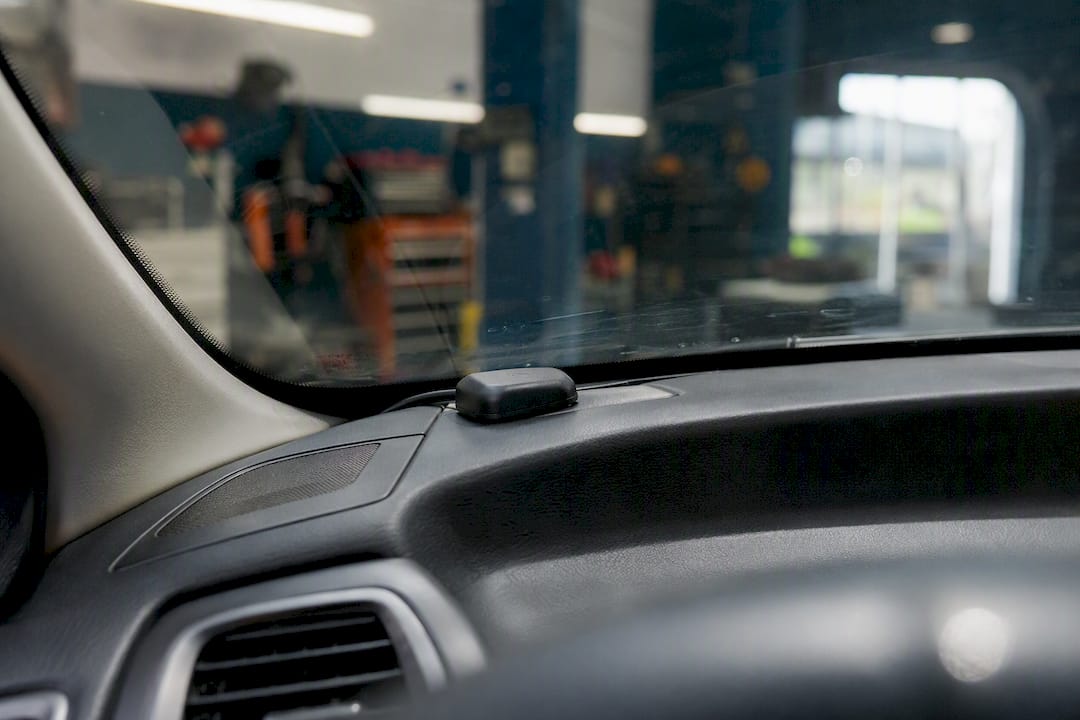
The rear parcel shelf is a workable third option in saloons where the boot and rear window create a reasonably unobstructed upward view, though it inherits the same coated-glass risk as the dashboard and adds more distance between the antenna and the roofline.
Vehicle type changes the calculus slightly:
- Saloons and hatchbacks: roof centre is usually straightforward and rarely obstructed
- SUVs and 4x4s (including Land Rover Defenders and Discoverys): roof racks, roof tents, or safari bars can create shadowing, so positioning slightly forward or aft of the rack often helps
- Vans: a high roofline gives excellent sky visibility, but internal bulkheads mean cable runs need more planning
- Trucks and trailers: separate tracking units on a trailer need their own antenna and ground plane, since the tractor unit’s roof won’t help a trailer-mounted device
| Location | Sky visibility | Ground plane | Best suited to |
|---|---|---|---|
| Roof centre | Excellent | Built-in (metal roof) | Almost all vehicles |
| Dashboard top | Good, if glass is uncoated | None (needs added plane) | Vehicles where roof access is impractical |
| Rear parcel shelf | Moderate | None (needs added plane) | Saloons with limited dash access |
How should you mount and orient a GPS antenna?
Patch antennas, the flat, puck-shaped type fitted to most vehicle trackers, must go on face-up and perfectly level. Tilt one on its side or angle it steeply and you cut its effective view of the sky, since the internal element is designed to receive signals arriving from above, not from the horizon. A few degrees of slope on a curved roof won’t cause problems, but anything approaching vertical will.
Follow this sequence when fitting one:
- Clean the mounting surface thoroughly, grease and road grime affect adhesive and magnetic mounts alike
- Position the antenna as close to roof-centre as the vehicle’s shape allows
- Confirm it sits flat, face-up, with no tilt introduced by the mount itself
- If mounting on glass or a non-metal roof panel, add a metal ground plane underneath
- Check the manufacturer’s IP rating before fitting anything externally, then seal the cable entry point
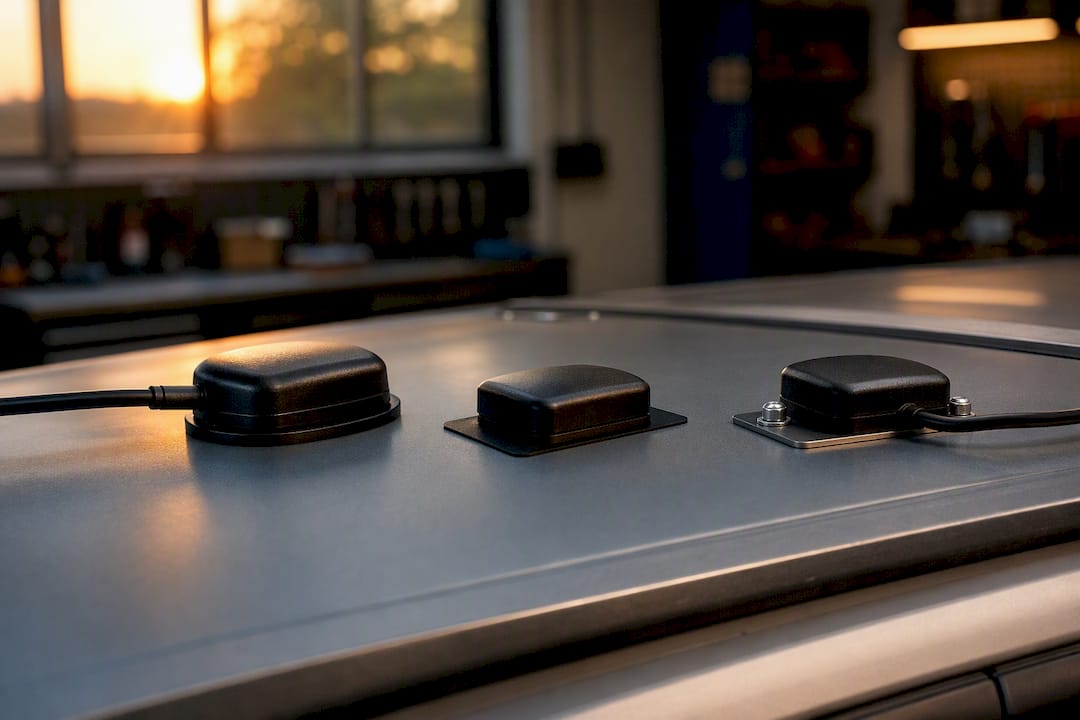
On ground planes: Racelogic’s guidance recommends a metal disc with a radius of at least 5 cm, and most installers find 10 to 15 centimetres works well in practice for vehicle installations. If you’re mounting on a glass sunroof panel or a composite roof, adhesive-backed metal foil stuck inside the cabin directly beneath the antenna position is a genuinely workable fix, not a compromise.
Mount types each carry trade-offs. Magnetic mounts are quick and reversible but can shift at speed or in a car wash. Adhesive mounts suit glass and stay put, though they’re harder to reposition once fixed. Screw or through-hole mounts are the most secure for a permanent professional install but require drilling, which is exactly why this work is best left to someone who’s done it before.
Pro tip: Never assume an antenna is weatherproof just because it lives outdoors. Check the manufacturer’s IP rating before an external fit, and seal the cable entry point properly. A cheap gland or a bead of sealant now saves a corroded connector in eighteen months.
What causes GPS signal interference in a car, and how do you avoid it?
Your GPS antenna isn’t fussy about weather, but it’s sensitive to electrical noise. Radio transmitters, dash cams, and power electronics can desensitise the receiver, effectively drowning the faint satellite signal in local electrical chatter. GPS signals arriving from space are extraordinarily weak by the time they reach your roof, so even modest interference nearby can matter more than distance from the source might suggest.
Keep these separations in mind when planning a fit:
- Route the antenna cable away from ignition wiring, the alternator, and any high-current cabling
- Leave physical space between the GPS antenna and cellular or AM/FM antennas mounted on the same vehicle
- Avoid running the GPS cable parallel to LED driver circuits or dash cam power leads for any distance
- Keep cable runs as short as practically possible
Cable length matters more than most owners expect. Every metre of coax introduces signal loss, and beyond a certain point that loss outweighs whatever gain the antenna provides. ArduSimple’s installation guidance recommends switching to an active antenna, one with a built-in amplifier, when cable runs get long, rather than relying on a passive antenna and hoping the receiver can compensate.
Connector care is where a lot of otherwise good installations fail. Sharp bends in coax cable degrade the internal shielding over time, and pinch points, where a cable gets trapped under trim or through a door seal, cause slow, hard-to-diagnose signal loss rather than an obvious failure. Route cable with gentle curves, secure it away from moving parts, and seal any point where it passes through bodywork. If you’re running multiple antennas (GPS alongside a cellular modem, for instance), a few centimetres of separation between them reduces mutual interference more than most people assume.
How do you test and troubleshoot GPS reception in a car?
Start by measuring time-to-first-fix (TTFF), how long the receiver takes to acquire a reliable position after power-on. In open sky with a well-placed antenna, this should typically happen within a minute or two. If it regularly takes far longer, or never locks at all, something in the placement or cabling is working against you.
Work through it in this order:
- Move-and-test: park in completely open sky, away from buildings, trees, and covered parking, and re-test. If reception improves dramatically, your original spot has an obstruction problem, not a hardware fault.
- Swap-mount test: if you’re deciding between roof and dashboard, physically test both. A dash unit that struggles under open sky almost always points to coated glass.
- Match the symptom to the cause: a slow lock usually means partial sky obstruction; frequent dropouts while driving point more often to EMI or a damaged cable than to the antenna itself.
- Check satellite count: most GPS apps and tracker dashboards display the number of satellites in view. Fewer than four means you won’t get a reliable fix at all.
Urban environments add a wrinkle that no amount of careful mounting fully solves. Tall buildings create what engineers call an urban canyon, where signals bounce off surrounding structures and reduce genuine satellite visibility, even from a perfectly placed antenna. Raising the antenna and preserving a clear view toward the horizon are the most effective countermeasures, though nothing eliminates the effect entirely in dense city centres.
If you’ve worked through every step above and reception still lags, it’s worth upgrading to an active, multi-constellation antenna, one that tracks GPS alongside GLONASS or Galileo satellites, or calling in a professional installer who can diagnose issues you can’t easily see from the driver’s seat.
Why professional installation matters for Land Rover owners
Land Rover vehicles bring their own placement quirks. Defenders often carry roof racks, safari bars, or roof tents that shadow part of the sky. Range Rovers and Discoverys frequently specify heated or athermic windscreens as standard, which rules out a straightforward dashboard fit for many owners without them realising it. Getting this wrong doesn’t just mean a slow fix, it can mean a tracker that fails to report at the exact moment it matters most.
This is precisely the gap Thatcham-approved installation is built to close. Lrd-track fits insurance-approved trackers specifically for Defender, Discovery, and Range Rover models, and that specialisation means installers already know where the roof geometry causes problems and where the glass is coated before they even open the bonnet.
What that professional fit actually delivers:
- Roof routing that avoids racks, tents, and safari bars without compromising the antenna’s sky view
- Waterproof sealing at every external cable entry point, checked against the antenna’s actual IP rating
- Anti-tamper cable routing that keeps wiring away from points a thief could reach quickly
- Placement decisions based on the specific model, not a generic one-size-fits-all fitting guide
If you drive a Land Rover and want the tracker fitted properly the first time, a professional install removes the guesswork entirely.
What most placement advice gets backwards
Most guides treat antenna placement as a checklist item, mount it somewhere high, job done. That misses the actual failure pattern installers see: a device with excellent specifications fails not because the hardware is weak, but because someone tucked the antenna under a roof rack or trusted a coated windscreen without checking it first.
The conventional advice also underplays cable routing. Owners obsess over antenna position and then run the cable straight past the alternator, undoing half the benefit of a good mount. If there’s one thing worth prioritising above all else, it’s this: get the roof-centre placement and ground plane right first, then treat the cable run with the same care. Everything else, upgrading to an active antenna, adding multi-constellation support, matters far less if the fundamentals are wrong.
For Land Rover owners specifically, this is why a generic fitting guide only gets you so far. Roof racks, safari bars, and heated glass are model-specific problems that reward model-specific experience.
Get your Land Rover tracked by people who know exactly where to put it
Reading about roof geometry and ground planes is one thing. Getting a tracker fitted correctly on your specific Defender, Discovery, or Range Rover is another. Lrd-track specialises exclusively in Land Rover models, which means every installation already accounts for roof racks, safari bars, and heated windscreens before the first cable is run.
That specialisation is the real advantage over a generic fit-anywhere tracker: Lrd-track’s Thatcham-approved installers know the roofline of a Defender differs from a Discovery, and they route, seal, and anti-tamper the wiring accordingly, backed by 24/7 monitoring and real-time alerts through the mobile app. If you’re weighing up options after reading this, the sensible next step is to compare tracker models and pricing and find the right fit for your vehicle, or go straight to the S7 Classic Defender Tracker if you already know Defender security is the priority.
Frequently asked questions
What is the best GPS antenna placement in a car? The centre of the exterior roof is the best GPS antenna placement for cars, since it gives an unobstructed view of the sky and uses the metal roof as a natural ground plane.
Can I mount a GPS antenna inside the car? Yes, the top of the dashboard near the windscreen works as an interior alternative, but only if the glass doesn’t have a metallic (athermic) coating, which blocks GPS signals almost entirely.
Does a GPS antenna need a ground plane? On a metal roof, the roof itself acts as the ground plane. On glass or non-metal surfaces, add a metal ground plane with a radius of roughly 10 to 15 centimetres beneath the antenna.
Why is my car’s GPS signal weak or slow to lock? Weak or slow GPS reception usually comes from poor sky visibility, a tilted antenna, nearby electrical interference, or a windscreen with a metal coating blocking the signal. Testing in open sky helps isolate the cause.
Should I install a GPS antenna myself or use a professional? Simple magnetic-mount units are fine for DIY fitting, but permanent installs involving drilling, waterproofing, and anti-tamper cable routing, particularly on Land Rover models, are best handled by a professional installer.
Sources
- Where to Mount a GPS Antenna in a Car, Truck or Fleet Vehicle
- GNSS antenna placement and setup − Racelogic Support Centre
- GPS/GNSS antenna installation guide − ArduSimple
- Multipath and urban canyon effects on GNSS (PMC article)